needle
A terminal music player with a full-screen TUI, a no-TUI mode that keeps your shell, a background daemon and a JSON-lines interface for scripts.
Features · Install · Use it · Keys · Configuration · How it works · Limits · Contributing




Run it locally, step by step
Install mpv:
brew install mpvon macOS orsudo apt install mpvon Debian and Ubuntu.Get the code:
git clone https://github.com/Gitguy268/needle.git
cd needle
Install Go 1.27 or newer.
Build it:
go build -o needle .Play some music:
./needle play ~/Music/song.mp3Run
./needleon its own for the full-screen player. See Keys below for how to quit and navigate.
Features
| Mode | Command | What you get |
|---|---|---|
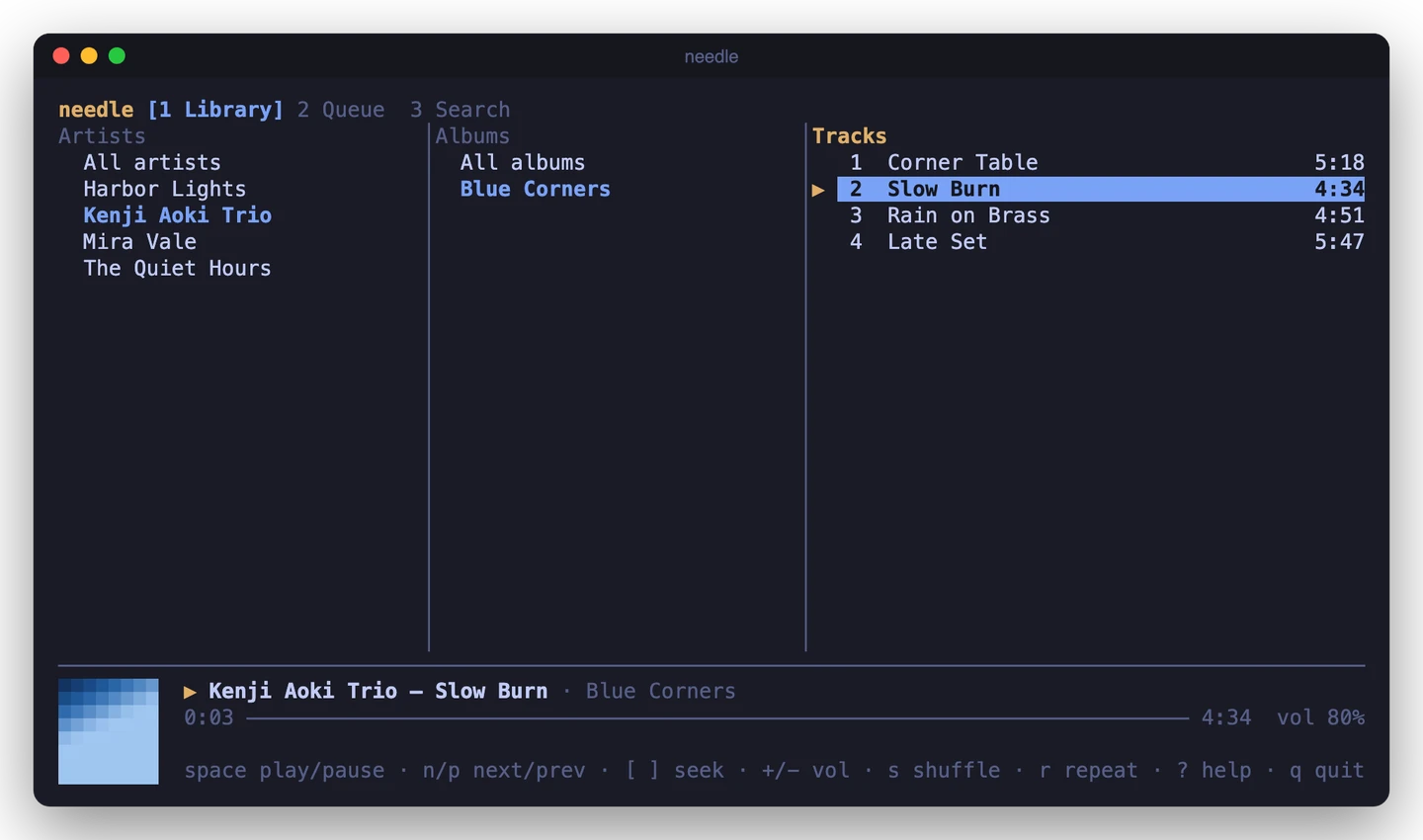
| TUI | needle |
Library in three columns (artist or genre, album, track), queue, live search, half-block cover art |
| Inline | needle play <files> |
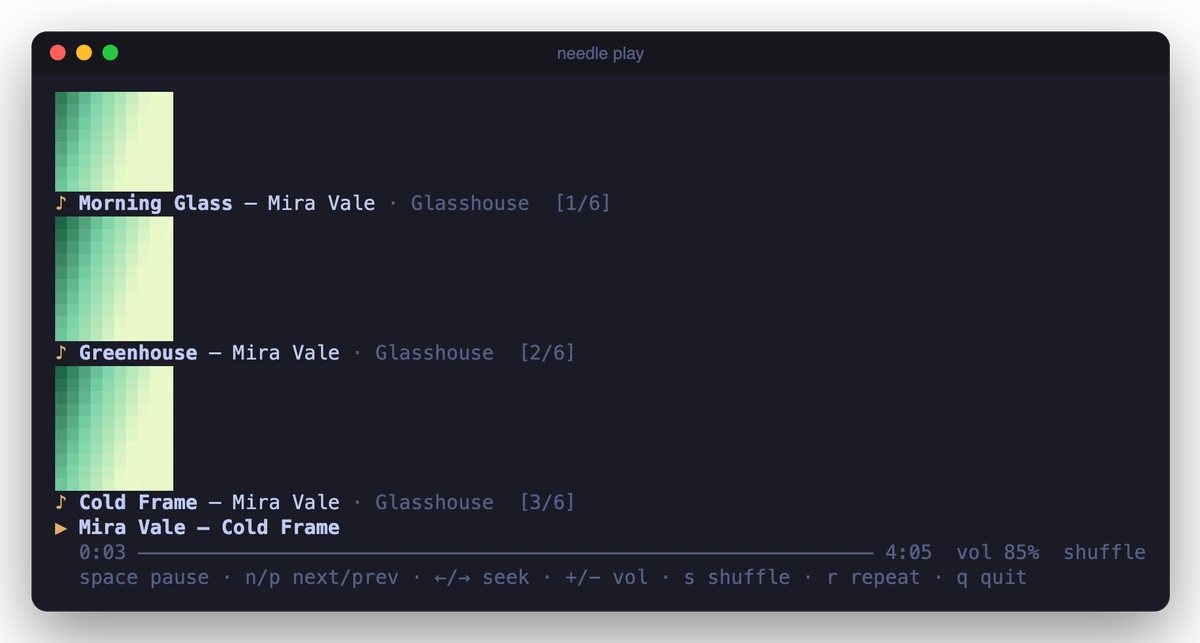
A few live lines under your prompt with single-key controls; the played tracks stay above as history |
| Plain | needle play <files> | cat |
One line per track, no escape codes, for pipes and logs |
| Daemon | needle daemon --background |
Plays with no UI; needle next, status, seek, vol and more control it |
| JSON lines | needle --headless, needle --raw |
Commands on stdin and events on stdout, or events only |
| Library | needle index, needle list |
A SQLite index of your tags with search and grouping |
- One player, many front ends. The control commands reach whichever needle is running: the TUI, the inline player or the daemon.
- Plays what mpv plays: MP3, FLAC, AAC/M4A, Ogg, Opus, WAV, AIFF and more, as well as radio streams and
.m3uplaylists. On a Mac without mpv it falls back to the built-inafplay. - Cover art from embedded pictures or
cover.jpg/folder.pngnext to the files. - Optional Pedalboard effects:
--fx bass|vocal|warm|loudor your own EQ chain. Local tracks are rendered through Pedalboard into a cache, then played by mpv or afplay. Effects are off by default, and Python is never started unless you ask for them.
Install
needle needs mpv. On macOS it can also play through afplay, which ships with the system, but with fewer controls (see Limits).
brew install mpv          # macOS
sudo apt install mpv      # Debian, Ubuntu
Then install needle with Go 1.27 or newer:
go install github.com/Gitguy268/needle@latest
Or build it from a clone:
git clone https://github.com/Gitguy268/needle.git
cd needle
go build -o needle .
The binary is pure Go (no CGO), so it cross-compiles with GOOS=linux or GOOS=darwin. Optional: install ffmpeg so needle index stores track durations up front. Otherwise they're filled in as tracks play.
Effects are optional and need Pedalboard, a Python package. needle still ships as one Go binary and starts Python only when effects are enabled:
python3 -m pip install pedalboard
Set NEEDLE_PYTHON to use a different interpreter, for example from a virtualenv. If effects are off, Python is never run. The effects tests and manual checks used Pedalboard 0.9.26.
Use it
Full-screen TUI
needle                  # your library; the first run scans ~/Music
needle ~/Downloads/album  # just these files, in the queue view
Pick an artist, an album or a track and press Enter to play it. 1 2 3 switch between Library, Queue and Search. ? shows every key.
Without the TUI
needle play ~/Music/Jazz
needle play song.flac https://radio.example/stream.mp3 mix.m3u
needle play --fx bass ~/Music/Jazz    # Pedalboard effects for local files
When stdout is a pipe or a file, needle play prints one plain line per track and exits when the queue ends:
needle play ~/Music/Ambient | tee played.txt
Daemon and control commands
needle daemon --background ~/Music/Ambient   # or run it in the foreground without --background
needle status
needle next
needle vol -20
needle seek 1:30          # also +10, -10, 90
needle shuffle on
needle repeat all         # off, all, one
needle add ~/Music/more   # load replaces the queue instead
needle queue
needle jump 4
needle watch              # print each new track as it starts
needle quit
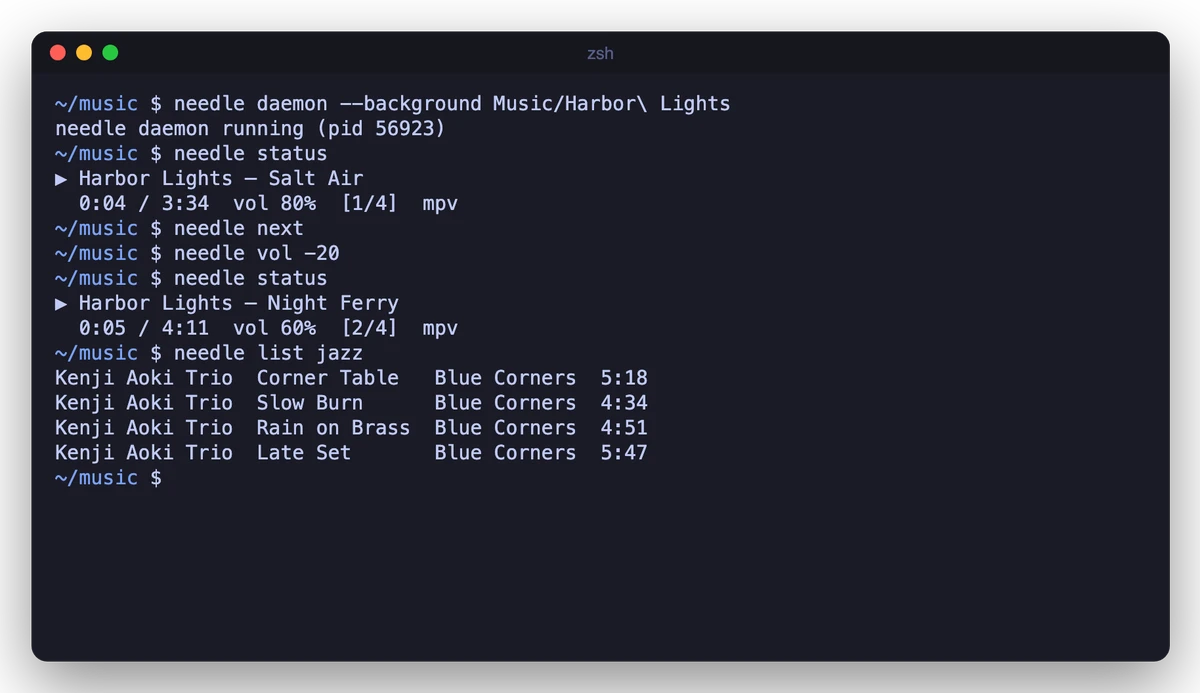
These commands talk over a Unix socket, so they also control a TUI or inline player that is already running. That makes them easy to bind to media keys or a status bar. Add --json to status, queue and watch for machine-readable output.
JSON lines
--headless reads one JSON command per line on stdin and writes replies and events on stdout. --raw plays files and only writes events.
printf '%s\n' '{"cmd":"load","paths":["/music/a.flac"]}' '{"cmd":"seek","value":30}' | needle --headless
needle --raw ~/Music/song.mp3 | jq -r 'select(.event=="track") | .state.track.title'
Commands and events
Commands take cmd plus, depending on the command, index (queue position from 0), path or paths, value, relative and mode. An optional id is echoed in the reply.
cmd |
Fields | Does |
|---|---|---|
play |
index or paths (optional) |
resume, play a queue position, or load and play paths |
pause, resume, toggle, stop |
playback state | |
next, prev |
prev restarts the track after 3 seconds |
|
seek |
value, relative |
seconds |
volume |
value, relative |
0 to 100 |
shuffle |
mode: on, off, toggle |
|
repeat |
mode: off, all, one, cycle |
|
add, load |
path or paths |
files, folders, .m3u and URLs; load replaces the queue and plays |
clear, remove |
index for remove |
|
status, queue |
reply with state or queue |
|
subscribe |
mode: positions (optional) |
stream events on this connection |
quit |
stop the daemon or headless session |
Replies look like {"ok":true,"state":{...}} or {"ok":false,"error":"..."}. Events look like {"event":"track","state":{...}}, where event is one of track, state, position (once a second), queue, error or finished. The state object holds status (stopped, playing, paused or loading), track, index, length, position, duration, volume, shuffle, repeat, backend and caps (what the backend can do).
The same protocol runs on the daemon socket, so socat - UNIX-CONNECT:$HOME/.cache/needle/needle.sock works as a client too.
Library
needle index                       # scan the folders in config.toml (default ~/Music)
needle index ~/Music ~/Downloads   # or these
needle list jazz                   # words match title, artist, album and genre
needle list --artist "Mira Vale" --album Glasshouse
needle list --group artists        # or albums, genres
needle list --search rain --paths > rain.m3u && needle play rain.m3u
needle list --json
Rescans only read files whose size or modification time changed. In the TUI, u rescans.
Cover art
needle art song.flac prints a cover once. It uses Kitty graphics in Kitty and Ghostty, iTerm2 images in iTerm2 and WezTerm, Sixel in foot and mlterm, and half blocks everywhere else (--mode picks one). The TUI and the inline player always draw half blocks, which survive redraws in every terminal with colour.
Keys
TUI
| Key | Action |
|---|---|
| Space | play / pause |
| n p | next / previous |
| [ ] · { } | seek 5 s · 30 s |
| + - | volume |
| s r S | shuffle · repeat mode · stop |
| 1 2 3 or Tab | Library · Queue · Search |
| / | search |
| ↑ ↓ j k, PgUp PgDn, g G | move |
| ← → h l | library column |
| Enter | play the selection (on a track: the whole list, from that track) |
| a · A | add to the queue · add all search results |
| b | browse by genre instead of artist |
| d D c | queue: remove · clear · go to current |
| u | rescan the music folders |
| ? · q | help · quit |
Inline player
| Key | Action |
|---|---|
| Space | play / pause |
| n p | next / previous |
| ← → · Shift+← → | seek 5 s · 30 s |
| + - | volume |
| s r | shuffle · repeat mode |
| q | quit |
Configuration
Everything works without a config file. To change something, copy config.toml.example to ~/.config/needle/config.toml:
music_dirs = ["~/Music", "/Volumes/NAS/Music"]
backend = "auto"     # auto, mpv or afplay
volume = 80
art = "auto"         # auto, halfblock, kitty, iterm, sixel or off

[effects]
enabled = false      # off unless you ask for it
preset = "bass"      # bass, vocal, warm or loud
cache_mb = 1024      # processed WAV cache under ~/.cache/needle/effects
# [[effects.chain]]  # a custom chain replaces the preset
# type = "PeakFilter"
# cutoff_frequency_hz = 250
# gain_db = -2.5
# q = 1.0

[theme]
accent = "#e0af68"   # "#rrggbb" or an ANSI number such as "13"
dim = "8"
select = "#7aa2f7"
Two themes are built in, Nujabes and Ye: Graduation. Set name = "nujabes" or name = "graduation" under [theme], and remove the colour lines, because colours set in the file override the preset. The TUI recolours the terminal where the terminal allows it, and both the TUI and the inline player show a line of text from the theme. Both themes are unofficial tributes; see NOTICE.
Flags override it for one run: --backend, --volume, --shuffle, --repeat, --art, --fx, --theme. --theme takes default, nujabes or graduation. --fx takes off, bass, vocal, warm, loud or custom (the chain from config).
| File | Default | Override |
|---|---|---|
| Config | ~/.config/needle/config.toml |
$XDG_CONFIG_HOME |
| Library index | ~/.local/share/needle/library.db |
$XDG_DATA_HOME |
| Daemon log | ~/.local/share/needle/daemon.log |
$XDG_DATA_HOME |
| Control socket | ~/.cache/needle/needle.sock |
$XDG_RUNTIME_DIR, $NEEDLE_SOCKET |
| Effects cache | ~/.cache/needle/effects |
$XDG_CACHE_HOME |
| Extra mpv options | $NEEDLE_MPV_ARGS, for example --ao=null or --audio-device=... |
|
| Python for effects | python3 on PATH |
$NEEDLE_PYTHON |
How it works
Design
coreowns the queue, shuffle order, repeat and the event stream, and knows nothing about terminals. Every front end (TUI, inline, plain, daemon, JSON lines) drives the samecore.Player.- Backends sit behind one interface with a
Capabilitiesstruct, and the front ends hide the controls a backend lacks.- mpv runs as a child process in idle mode. It is connected through a socket pair (
--input-ipc-client=fd://3), so it quits when needle does. - afplay runs once per track. It is paused with
SIGSTOP/SIGCONT, its position comes from the wall clock, andafinfogives the duration.
- mpv runs as a child process in idle mode. It is connected through a socket pair (
- Effects are a wrapper backend.
backend/fxsits in front of mpv or afplay. For a local track it asks a long-lived Python helper to apply a Pedalboard chain, writes a 24-bit WAV into the cache, then hands that file to the normal backend. Streams and URLs bypass it. The key includes the path, size, mtime, chain, Pedalboard version and helper version, so edits and upgrades re-render; the cache evicts the oldest files abovecache_mb. - One protocol.
protodefines the JSON-lines commands and events. The daemon socket (mode 0600),--headlessand--rawall use it, and the control subcommands are thin socket clients. - The library is SQLite through the pure-Go
modernc.org/sqlite, with tags read bydhowden/tag. Indexing is parallel and incremental. - Terminal safety. Tags and stream titles are stripped of control characters before they reach the screen.
Limits
- macOS and Linux only. The daemon uses a Unix socket, and the afplay fallback is macOS-only.
- No gapless playback. Each track is loaded on its own, so there can be a short gap between tracks.
- The afplay fallback is basic. It cannot seek or play URLs, volume changes apply from the next track, and pausing stops the process.
- Image protocols are limited to
needle art. Kitty, iTerm2 and Sixel output is checked against each protocol's byte format in tests, but it hasn't been tried in those terminals yet. The TUI and inline player use half blocks. - Effects are offline and local only. Pedalboard renders each track before it plays, so the first play is slower; later plays use the cache. A whole track is decoded into memory while it renders, which matters for very long files. Streams play without effects, and a format Pedalboard cannot decode plays unchanged (set
NEEDLE_FX_DEBUG=1to see why). Changing the chain, the file or the Pedalboard version re-renders. There is no real-time visualiser, lyrics, scrobbling or streaming-service login.
Contributing
Bug reports, ideas and pull requests are welcome. See CONTRIBUTING.md for building and the checks, SECURITY.md for reporting security problems privately, and the Code of Conduct.
Credits
needle's design borrows ideas, not code, from cliamp, musikcube, listnr, Kronos and haskell-player. NOTICE says which idea came from where, and lists the libraries needle is built with.
License
MIT © 2026 Lucas Van De Weerd. Third-party licences are listed in NOTICE. Pedalboard is GPL-3.0 and is used only as a separate, optional Python program; it is not linked into needle.